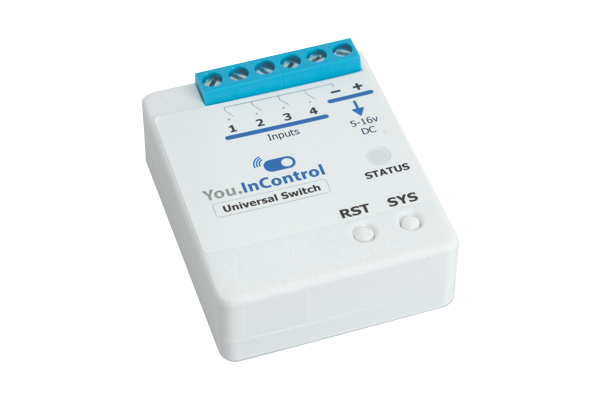
The Uni-Switch
This little device allows you to use normal light switches, custom switches, sensors and other systems to control your You.InControl system.
$80.00 AUD, inc GST
$72.73 AUD, ex GST
Description
The Universal Switch (or Uni-Switch) is a wireless, four-channel, input device for You.InControl systems.
It allows a large array of switches, buttons, microcontrollers and sensors to control your system.
You can use toggle switches, button switches, reed switches, limit switches, mercury switches, vibration switches and just about any type of sensor switch. It also allows beautiful designer switches to be used with this system.
The Uni-Switch also allows Arduinos and Raspberry Pis, computers, security systems, other control and automation systems, and just about any other microcontroller with outputs, to control your system as well!
What’s more, each of the four channels can be configured for State (On/Off) or Multi-Click (six inputs – Short Press (S), SS, SSS, Long Press (L), SL, or SSL). And, each state or multi-click combination can trigger up to 99 Actions. That makes this little device able to trigger up to almost 2,400 Actions through the system, which is a whopping amount for just ONE device on a You.InControl system!
A device like this has never existed before… to throw together just about any type of switch, button or microcontroller and be able to easily and almost instantly use it to wirelessly control your world, that is true power.
Oh, and YOU can install it too… no need for an electrician. However, if you’re planning on digging around in the walls to put it in there and there’s the possibility of encountering higher voltages (such as 240v)… get an electrician to do it – they know how to do it safely.
Intro Video
What Can You Control?
In short, just about any switching device that connects and disconnects a signal wire can be used. For more advanced users, injecting 0v or 3.3v into an input can also be used.
Here are some of the switches and devices that can be used…
- ✓ Mechanical Switches
- • 240v On/Off switches (like normal house switches)
- • 240v momentary switches (On when pressed, Off when not pressed)
- • Rocker type On/Off switches
- • Push button type On/Off switches
- • Momentary switches
- • Reed switches
- • Limit switches
- • Mercury switches
- • Tilt switches
- • Float switches
- • And, thousands of others
- ✓ Makeshift Switches
- • Two pieces of wire that you touch together and take apart
- • Paper clip switches
- • Foil board switches
- • For other ideas, look up ‘Makeshift Switches’ on Google
- ✓ Sensors Sensors can also be used. Please note, however, you should only use sensors that connect and disconnect the wire from Ground to the Input, unless you know what you’re doing. You can also use sensors that ground the input when triggered; however, you must ensure that the Uni-Switch is never sent voltages less than 0v or greater than 3.3v. Sensors may include:
- • Temperature sensors
- • Break beam sensors (such as those used to detect cars in the way of a garage door)
- • PIRs
- • Motion sensors
- • Radar sensors
- • Pressure sensors
- • Vibration sensors
- • Tilt sensors
- • And, hundreds of others
- ✓ Microcontrollers or other systems Microcontrollers, computers and other systems can also be used to inject a Low (0v) or High (3.3v max) voltage into an Input. However, this is a little more for advanced users because the signal injected into the Uni-Switch inputs MUST NOT EXCEED 3.3v. This is pretty easy to do using a ‘logic level converter’. There’s lots of information on these on the web. This means that the following Devices and things can be used to inject signals into the Uni-Switch:
- • Any Arduino or Arduino-like device
- • Raspberry Pis
- • Beagle Bones
- • Computers with configurable output pins
- • Security systems with output pins
- • Other systems (such as Nest products) with output pins
- • And, a stack of others
So, all in all, the Uni-Switch can handle a lot of different switching abilities.
Where Can You Use It?
Coming soon.
Features
Here are some of the key Uni-Switch features:
- ✓ Highly adaptable. The Uni-Switch allows just about any switch, button, sensor or microcontroller to interact with your system.
- ✓ ‘State’ functionality. You can use simple state or On/Off switches to do things on your system. You can then set what actions you want to do when you turn the switch On and Off.
- ✓ ‘Multi-Click’ functionality. You can use momentary buttons (press On, stop pressing Off) buttons in Multi-Click mode. Here are the button combinations:
- • Short press (S)
- • Short-Short press (SS)
- • Short-Short-Short press (SSS)
- • Long press (L)
- • Short-Long press (SL)
- • and Short-Short-Long press (SSL)
- ✓ Powerful. The Universal Switch allows you to do so many things… you can use it as part of your system to turn lights on and off, switch electrical controls, control fans, pumps, irrigation, open garage doors or whatever you want. Once you understand the fundamentals, you’ll really be able to unleash your imagination upon the real world!
- ✓ Identification LED and Sound. Can’t remember which Universal Switch is which, simply turn on the locating LED strobe and alarm to find the right device straight away.
Specifications
| Dimensions | 44 mm (w) x 51 mm (h) x 19 mm (d) |
| Weight | 28 g |
| Security | 128 bit rolling encryption |
| Radio Frequency | 915 MHz |
| Colour | White and others if you want… |
| Use | Mainly indoors, however, outdoors if you look after it (it’s not designed to get wet yet) |
| Material | 3D Printed PETG co-polymer |
Manuals
Safety & Warnings
Approvals & Certifications
Coming soon.